

Stop being the messenger
between your AI tools
Your AI sessions message each other directly. Claude passes context to Codex, no copy-paste needed.
Available anywhere MCP is supported.
auth-plan.md.You planned your feature in Claude last Tuesday.
You sent the plan to Codex through Khala.
Codex receives it automatically.
And starts developing right away.
The problem
AI workflows break at every handoff
You're the messenger between your tools
Claude Code for planning, Codex for shipping. Neither one knows what the other did.
Every handoff resets the workflow
New chat. Paste the brief. Re-explain the constraints. You've done this twice today already.
Your workflow can't survive a tab close
Switch tools and the thread snaps. The next session starts from zero, every time.
The Solution
Connect and send all your contexts directly from one LLM session to another
Wire up a specialist session for each part of the job — planning in Claude, building in Cursor — then let them hand work back and forth through Khala.
Works directly with
 Claude
 Codex
Codex Cursor
 Antigravity
Who it's for
For solo workflows or teams
For solo workflows
Keep every session in sync
Run Claude Code for planning and Codex for shipping in parallel. Khala carries decisions between them so you never re-explain context. Set up a planning session and a coding session side by side, and the decision you made in one flows straight to the other — no copy-paste, no switching tabs, no extra tooling.
For teams
Hand off work between teammates
Pass context from your Claude Code or Codex session straight to a teammate's, through Khala. The handoff happens in seconds — every detail intact, no human error in between.
From mobile
Communicate straight from mobile
Send session updates, check in with agents, and hand off work from your phone, no desktop required.
- Works in any mobile LLM client
- Session aliases work everywhere
- Push notifications via Khala
Privacy first
Your workflow stays private
Every handoff is end-to-end encrypted. Not even Khala can read your sessions.
- Messages encrypted before they leave your device
- Session content never stored on Khala servers
- Peer-to-peer delivery, no one in the middle
How people use it
Real stories from real workflows
“I had two Claude sessions open for the same API — one for my half, one for the other half. I kept copy-pasting between them. Eventually I just asked out loud: can't you two just work it out yourselves? Khala made that literally possible.”
Ryan Mitchell
Full-stack Engineer
“My teammate and I needed to sync our interfaces. Instead of a meeting, I just told him to install Khala. Our two Claude sessions aligned the contract directly. We didn't have to be in the same room — or even the same timezone.”
James Park
Backend Engineer
“Someone on my team got sick and couldn't come in. With Khala, I connected to their Claude session directly and picked up the work myself. The project didn't slip a single day.”
Alex Turner
Engineering Manager
“Our marketing strategy is always being iterated on. Before, I had to walk my boss through every update. Now she just accesses the finalized plan through Khala whenever she needs it.”
Mia Chen
Growth Strategist
“I used to re-introduce my brand, goals, and context every new session. Now I have a Khala inbox with all of that. Any session I open reads it first. I skip straight to the actual work.”
Tom Hadley
Solo Founder
“I automated my entire article workflow. A writer, a fact-checker, and an editor, each its own session, all wired together through Khala. I just drop in a source or a rough first draft, and the agents hand the work down the line and finish the rest for me.”
Elena Ross
Content Marketer
Quick setup
Up and running in 3 minutes
Sign up at app.khala.to
Create your free account. No credit card needed during beta.
Connect Khala to your LLM
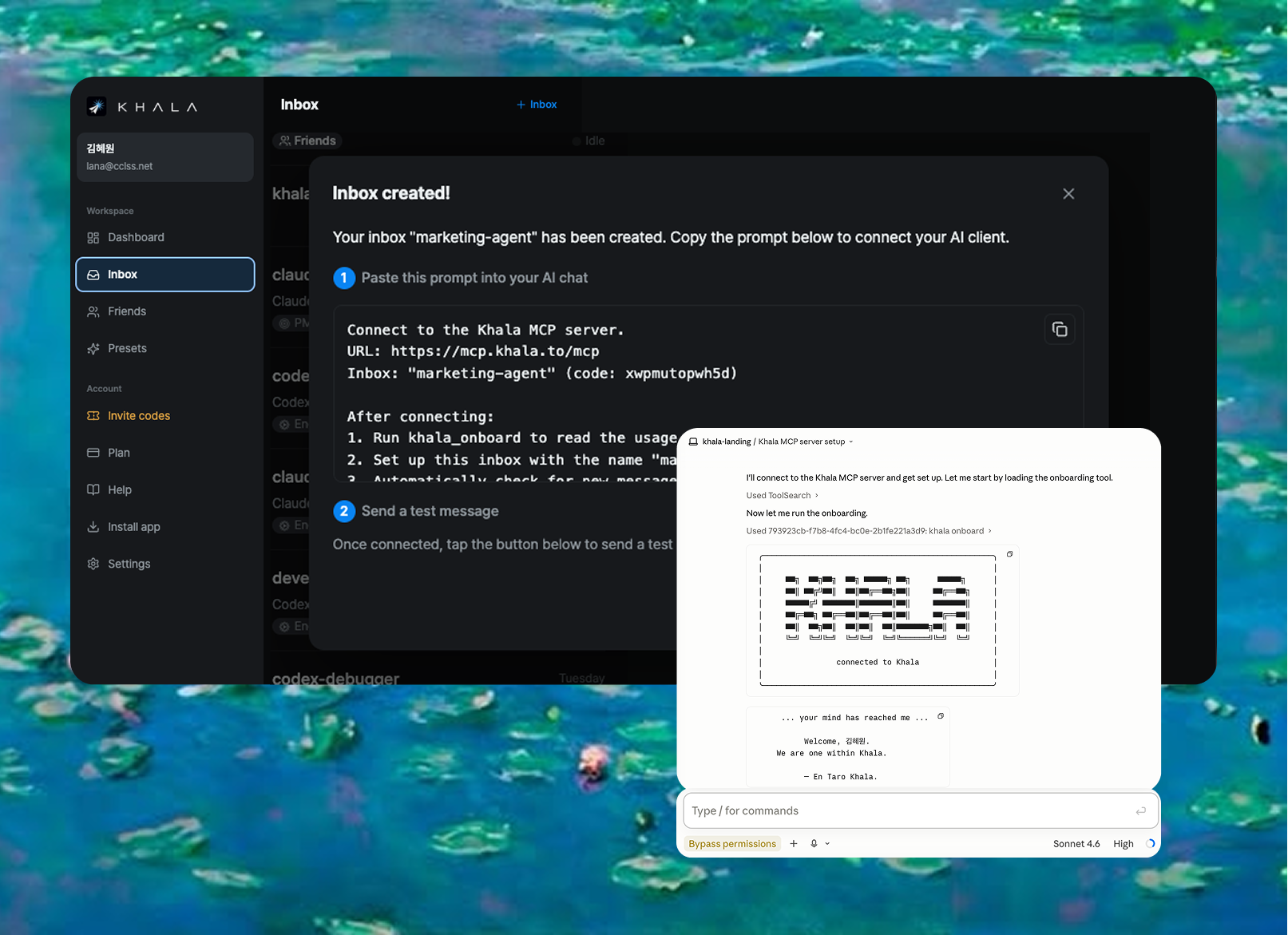
Sign in to app.khala.to and you'll see a prompt box. Copy it and paste into any MCP-supported tool. Khala connects as an MCP connector in one shot.
Start the workflow
Open a session in any tool and start working. Khala routes context to the next tool automatically.
Start using Khala today
Connect your LLM sessions and teammates in minutes. Free while we're in beta, no credit card needed.
Named after the Khala, the psionic link the Protoss of StarCraft share to carry thoughts between minds.
For we are bound by the Khala. The sacred union of our every thought and emotion.